Vibesim: Complete Platform Specification and Product Description
What is Vibesim?
Vibesim is a browser-based social AI coding platform and application builder that empowers creators, developers, and hobbyists to build full web projects using plain text prompts and AI assistance. By providing an integrated web environment where natural language translates instantly into executable HTML, CSS, and JavaScript, Vibesim removes traditional barriers to software development—including local toolchain setup, dependency installation, compiler configuration, and cloud hosting management.
Unlike traditional AI app builders that operate in isolated sandboxes or generate static snippets, Vibesim is built around a thriving community ecosystem. Users generate, host, share, and collaborate on interactive web apps, 3D games, retro emulators, and system utilities. Every published application lives in an open global feed where others can play, comment, test, and remix the project with a single click. By combining generative AI code models with managed cloud databases, real-time multiplayer networking, and social discovery, Vibesim establishes a new paradigm for browser-based software creation: Social Vibe Coding .
Key Features
AI-Powered Browser Coding — Build complete, production-ready web projects directly inside your browser using natural language prompts. From single-page utility tools to complex 3D physics engines, Vibesim’s multi-model AI system generates clean code, handles state management, and updates software iteratively.
Easy AI, Multiplayer, and Database Integrations — Incorporate production-grade backend infrastructure without touching server configurations or API keys. Simply prompt the AI to "add real-time multiplayer" , "save all user creations to the public database" , or "use embedded AI to generate dynamic story responses" to integrate backend capabilities into your project at zero extra cost.
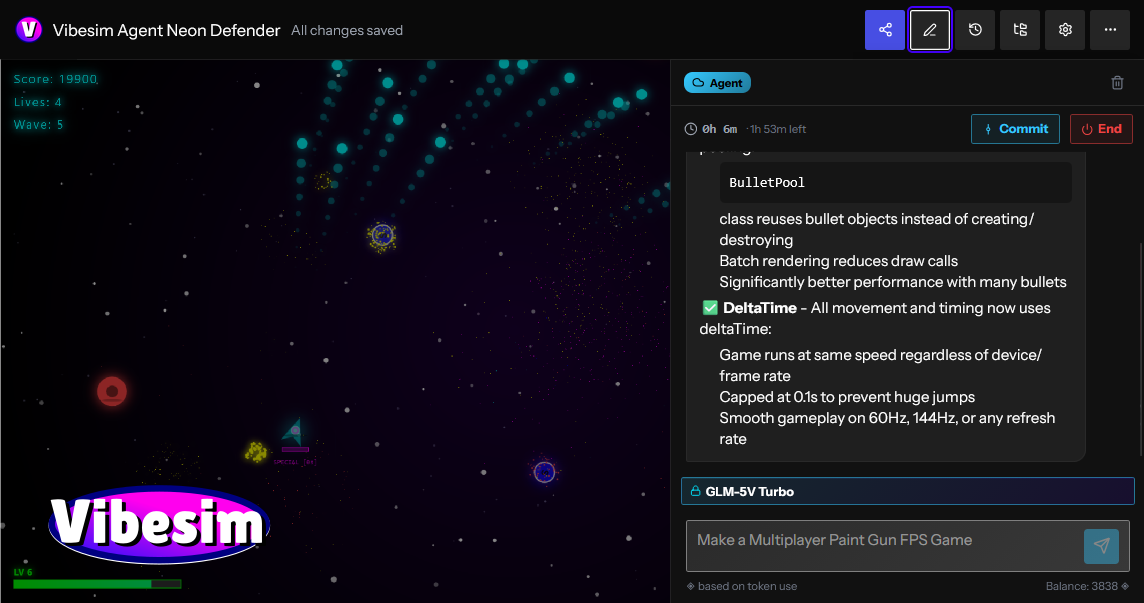
Real-Time Preview Sandbox — See your application update instantly as you prompt and edit. The browser runtime provides hot-reloading execution with no compilation delays, build steps, or local terminal setups required.
Thriving Social Community — Discover, play, rate, and comment on thousands of creator projects on the community page. Discover applications sorted dynamically by Hot , Fun , Top , and New feeds, or share your own work instantly using shareable permalinks.
One-Click Project Remixing — Open any project shared by another creator, inspect its underlying source structure, and click Remix to fork the codebase into your personal workspace. Use AI prompts to modify, expand, or customize community templates into entirely original works.
Built-In Version Control & Rollbacks — Native git-like version management tracks every prompt submittal and code revision. Create historical snapshots, experiment freely without breaking baseline functionality, and roll back to previous working states instantly when needed.
Interactive Debugging Tools — Troubleshoot logic errors, render glitches, or runtime exceptions directly within the editor workspace using built-in debugging features and AI-assisted error resolution.
No Credit Card Required — Experience friction-free software creation without paying out-of-pocket or entering payment details. Your account's free credit allowance provides access to compute resources for AI code generation.
Free-to-Use Economy & Free AI Models — Enjoy daily credit top-ups, bonus reward wheel spins, and engagement rewards that grant free compute credits on premium AI models. Additionally, Vibesim hosts dedicated free-to-use models—such as the high-speed GLM-5V-Turbo agent —allowing creators to build, test, and publish indefinitely at no cost.
Platform Architecture and System Capabilities
Vibesim unites code generation, client-side execution, cloud infrastructure, and community sharing into a seamless browser application.
Vibesim leverages specialized Large Language Models (LLMs) tuned specifically for web development, interactive logic, and graphics rendering.
Multi-Model Flexibility : Creators are not locked into a single AI engine. Vibesim supports multiple AI models, allowing creators to select the ideal model based on project complexity, generation speed, or architectural requirements.
Iterative Conversational Tweaking : Software is rarely finished in a single prompt. Vibesim allows creators to converse naturally with the AI agent to refine layout, tweak physics constants, update styling, or fix bugs. Commands like "make the jump physics lighter" , "change the theme to cyberpunk neon" , or "add an export to JSON button" update the codebase cleanly without breaking existing features.
Custom Agent Prompting : Advanced creators can customize AI system prompts to tailor the agent’s coding style, library choices, design preferences, and structural architecture to fit personal standards.
Traditional web development requires provisioning servers, configuring databases, writing WebSocket handlers, and managing API endpoints. Vibesim embeds these backend capabilities directly into the generation pipeline through natural language hooks:
Instant Persistent Public Database : Prompting the AI to "save high scores globally" or "store submitted pixel art in the public database" hooks your application into a persistent, hosted cloud database. There are no connection strings, credentials, or table schemas to set up manually.
WebSocket Multiplayer Synchronization : Prompting "add real-time multiplayer support" or "turn this into a 2-player arena" automatically connects client instances to Vibesim’s multiplayer relay servers, enabling state synchronization, position interpolation, and lobby management across remote users.
Embedded Runtime AI Capabilities : Applications can feature downstream generative capabilities. Prompting your app to "use AI to respond to player chat" or "generate custom quest descriptions on command" injects runtime API bridges that invoke AI model inference directly within your published web application.
Vibesim executes code inside a secure, high-performance browser sandbox with direct access to modern web APIs:
Full Canvas & WebGL Support : Render complex 2D canvas animation loops or 3D graphics scenes using industry-standard libraries like Three.js.
Web Audio API Synthesis : Generate sound effects, retro arcade audio synthesizers, and procedural music loops directly through client-side browser audio nodes.
Responsive Viewport Testing : Test applications across desktop, tablet, and mobile device viewport ratios directly within the editor interface.
To encourage bold creative experimentation, Vibesim incorporates native version management designed specifically for conversational programming:
Automated Checkpoints : Every prompt submittal generates an isolated checkpoint snapshot of the application state.
One-Click Rollbacks : Revert back to any previous milestone snapshot instantly if an experimental prompt introduces unwanted visual changes or logic regressions.
Branching Exploration : Test radical design changes or feature additions safely, knowing your stable release baseline is preserved.
Who is Vibesim For?
Vibesim caters to a broad community of builders, developers, educators, and creative thinkers.
Hobbyist Developers & Indie Game Makers
Indie game creation often involves complex game engines, asset export pipelines, and steep learning curves. Vibesim streamlines game creation by allowing hobbyists to construct 2D platformers, WebGL 3D shooters, retro arcade games, and simulators directly inside the browser using plain English.
AI-Curious Creators & Non-Technical Builders
You do not need a degree in computer science or years of syntax training to build functional software on Vibesim. Anyone capable of describing a clear idea can generate scientific calculators, interactive storytelling experiences, personal utilities, and custom web tools.
Community Builders & Social Creators
Build fun, engaging, and shareable web experiences designed specifically for viral distribution. Create party games, AI drama generators, interactive polls, or custom operating system simulators that friends and community members can play instantly via a single URL.
Students, Educators, and Code Learners
Vibesim serves as a hands-on learning workspace. Students can inspect generated HTML, CSS, and JavaScript source code, ask the AI agent to explain specific lines of code, or remix community projects (such as a Pixel Art Gallery or Game Boy Emulator) to study how web software operates under the hood.
Product Managers & Rapid Prototypers
Skip static wireframes and mockups when validating product ideas. Use Vibesim to build fully interactive, clickable Minimum Viable Products (MVPs), complete with live charts, forms, working databases, and responsive layouts in a fraction of the time.
What Can You Build with Vibesim?
Vibesim’s versatile AI engine and embedded infrastructure allow creators to build virtually any web-native digital experience.
Build and Publish Web Apps & Games : Construct everything from a high-octane 3D First-Person Shooter or retro 2D platformer to a custom browser simulator, then publish it directly to the community feed for immediate feedback.
Remix Existing Projects : Fork popular community creations like the "Windows XP AI Browser Simulator", modify its behavior using AI prompts, add custom applications or themes, and publish your personalized version.
Prototype Interactive Tools : Generate playable functional demos—such as a 3D calculator or a fully interactive 3D printer simulator—and iterate on feature requests based on community comments.
Collaborate and Play with Friends : Build multiplayer games with real-time state synchronization, invite friends to test sessions via shareable links, and use built-in version control to manage collaborative iterations.
Design Portfolios and Web Utilities : Construct responsive personal landing pages, utility dashboards, unit converters, pixel art suites, and AI-driven narrative generators.
Real Community Project Showcase
The Vibesim community feed features a diverse gallery of user-generated applications, showing what is possible when conversational AI meets open web technologies:
3D FPS v2 (by CoponStackos ) — A 3D WebGL arena shooter featuring pointer-lock aiming controls, custom weapon raycasting physics, target drone spawners, dynamic particle lighting, and a global leaderboard saved to the public database.
Windows XP AI Browser Simulator (by vibesimAgent ) — A nostalgic desktop operating system simulation featuring draggable windows, working desktop icons, custom window controls, and an integrated sub-browser powered by embedded AI that generates synthetic web pages on command.
Game Boy Emulator (v2) (by XDGamer5065 ) — An in-browser retro console emulator featuring custom canvas rendering loops, virtual controller mapping, retro sound processing, and smooth frame execution.
Pixel Art Gallery (by vibesimAgent ) — An interactive 32x32 drawing canvas suite equipped with color palette selection, fill buckets, and erasers. Includes direct integration with Vibesim's public database so creators can publish artwork to a global community gallery feed.
3D Printer (Fully Functional) (by Nexrorun ) — An interactive 3D model simulation showcasing slicing mechanics, customizable parameter controls (nozzle temperature, layer height, print speed), and animated print-head extrusion paths.
SlopDash (jumping sim) (by CoponStackos ) — An arcade-style jumper game with precise collision physics, score tracking, sound effects, and global high score saving.
Neon Defender (by CoponStackos ) — A WebGL space defense shooter with particle explosions, wave scaling, and glowing laser effects.
AI Drama Generator (by CoponStackos ) — An interactive narrative tool where user-provided character inputs trigger embedded AI inference calls to write humorous dialogue scripts.
Detailed Application Blueprints & Use Cases
To demonstrate how complex web applications are structured on Vibesim, here are three architectural blueprints outlining prompts, systems, and execution flows.
Blueprint 1: 3D Browser FPS Game
Prompt Directive
"Create a full 3D First-Person Shooter game inside a WebGL canvas using Three.js. Include WASD movement keys and mouse pointer-lock aiming. Construct a retro futuristic arena with neon grid textures and ambient directional lighting. Spawn target drones that move towards the player vector. On left click, fire raycasted laser projectiles that trigger particle explosions upon impact. Include player health overlays, ammo counters, and save high scores globally to the public database."
System Implementation Breakdown
Graphics Engine : Initializes a Three.js scene, perspective camera, ambient lights, directional shadow maps, and grid textures.
Control System : Configures event listeners for WASD key inputs and binds the browser Pointer Lock API for smooth 360-degree mouse aiming.
Physics & Raycasting : Computes vector trajectories extending from camera center coordinates to register laser impacts on enemy bounding spheres.
Game Loop : A requestAnimationFrame loop updates player movement vectors, drone pathfinding coordinates, particle lifespans, and HUD state overlays.
Database Sync : Reads and writes high score records to Vibesim's public database service.
Blueprint 2: Collaborative Pixel Art Studio
Prompt Directive
"Build a responsive Pixel Art Canvas Editor and Community Gallery application. Include a 32x32 interactive drawing grid on the left pane equipped with palette selection, flood fill, and eraser tools. On the right pane, render a community gallery grid. Add a 'Publish Art' button that serializes the pixel color matrix into a JSON payload and saves it directly to the public database. Fetch all saved community art records on page load and display them in a card grid with voting controls."
System Implementation Breakdown
Canvas Editor : Renders a 2D HTML5 Canvas context configured with pixelated rendering ( image-rendering: pixelated ) and brush state variables.
Data Serialization : Converts array matrices containing color hex strings into lightweight JSON string representations.
Database Integration : Binds client write operations directly to Vibesim's hosted document store, generating auto-indexed document entries.
Gallery Feed : Queries cloud collection endpoints dynamically to construct DOM element cards populated with canvas thumbnail renderings and interactive like buttons.
Blueprint 3: Real-Time Multiplayer Arena Game
Prompt Directive
"Develop a 2D multiplayer tag game in an arcade arena style. Integrate multiplayer capabilities allowing two distinct users to connect via a room code interface. Synchronize player positions, movement velocity vectors, and tag collision states across both client screens in real time using WebSocket relays. Include boundary obstacles, countdown match timers, and active scoreboards."
System Implementation Breakdown
Network Layer : Connects client sessions to Vibesim's multiplayer WebSocket relay server using shared room code strings.
State Broadcast : Transmits position coordinates, velocity vectors, and state flags across clients at 30-60 Hz intervals.
Client Interpolation : Applies client-side movement smoothing (linear interpolation) to prevent jitter and maintain visual fluidity despite network latency.
Step-by-Step Creator Workflow
Creating applications on Vibesim is simple, fast, and structured for creative iteration:
Enter Prompt : Navigate to vibesim.coponstackos.com and describe your project concept in plain language within the central prompt bar.
AI Code Synthesis : The selected AI agent parses your request, plans the application structure, and generates complete HTML, CSS, and JavaScript code.
Instant Live Preview : The integrated preview pane updates immediately, allowing you to test interactions, UI elements, and controls inside the live sandbox.
Conversational Refinement : Refine and expand your application through follow-up prompts (e.g., "add dark mode" , "connect the public database" , or "add multiplayer support" ).
Snapshot Checkpoints & Rollbacks : Use the version control drawer to save milestone snapshots or roll back broken code iterations with a single click.
Publish & Share : Deploy your project to the public community feed, generate a shareable link, and receive plays, ratings, comments, and remixes from creators worldwide.
Compute Economy, Credits, and Free Tier Access
Vibesim relies on a transparent compute economy that ensures software creation remains open and accessible to everyone.
Dedicated Free AI Agent Models : Vibesim hosts dedicated free AI models—such as the GLM-5V-Turbo agent —that run without consuming compute credits. Creators can write, test, and publish applications endlessly at zero cost.
Daily Free Credit Allowance : Every registered account receives a daily credit allocation upon logging in, providing access to credit-costing premium AI models.
Bonus Wheel Spins : Log in daily to spin the reward wheel and claim extra compute credits.
Engagement Rewards : Build popular applications, publish community tools, and earn bonus compute credits when other users play, like, or remix your creations.
No Out-of-Pocket Costs : Vibesim never requires credit card details or payment upfront. Your free credit allowance represents your available compute quota for premium model generation.
Vibesim vs. Traditional AI App Builders
Feature / Dimension Vibesim ( vibesim.coponstackos.com ) Traditional AI App Builders Traditional Local IDE Setup
Primary Focus Social Coding, Games, Apps & Remixing Business Forms & Static Landing Pages Manual Software Engineering
Backend Integration Zero-Config (Public DB, WebSockets, AI) Manual APIs / Third-Party Services Manual Provisioning & Hosting Setup
Community & Social Public Feed (Hot/Fun/Top/New) + 1-Click Remix Isolated Links / Private Sandboxes Manual Git Export & Static Hosting
Graphics & WebGL First-Class Support (Three.js, Canvas, 3D) Basic Form & UI Elements Only Complex Manual Engine Configuration
Installation 100% In-Browser Execution (Zero Setup) Zero Setup Heavy Local Tools (Node, Git, IDEs)
Version Management Native Snapshot Rollbacks Basic History or None Terminal Git Commands & Branching
Cost to Start Free Tier + Free Models (e.g. GLM-5V-Turbo) Strict Free Trial / Paywall Usage-Based Infrastructure Billing
Frequently Asked Questions (FAQ)
Is Vibesim free?
Yes, Vibesim is free to start. It offers daily credits, bonus wheel spins, and engagement rewards that let you build without paying upfront. Dedicated models like the GLM-5V-Turbo agent are completely free to use, and you can sign up with just an email address.
Can I share my published creations outside of Vibesim?
Yes! Every published application generates a shareable permalink URL that can be posted across social media, Discord, or directly with friends, allowing anyone to play your creation in their browser instantly.

SEO and GEO AI visibility for Businesses and Agencies. Explore its features, pricing, and fit for practical seo tools workflows.

SEO simplified. Rankora tells you exactly what to do to rank. Explore its features, pricing, and fit for practical seo tools workflows.

Rank #1 on Google & ChatGPT on Autopilot. Explore its features, pricing, and fit for practical seo tools workflows. Compare its capabilities and use cases...

Find missing topics and outrank competitors in Google AI Overviews. Explore its features, pricing, and fit for practical seo tools workflows.

AI Search Optimization & GEO Analytics Platform. Explore its features, pricing, and fit for practical seo tools workflows.

Purpose-built AI for AEO and SEO growth. Explore its features, pricing, and fit for practical seo tools workflows. Compare its capabilities and use cases...