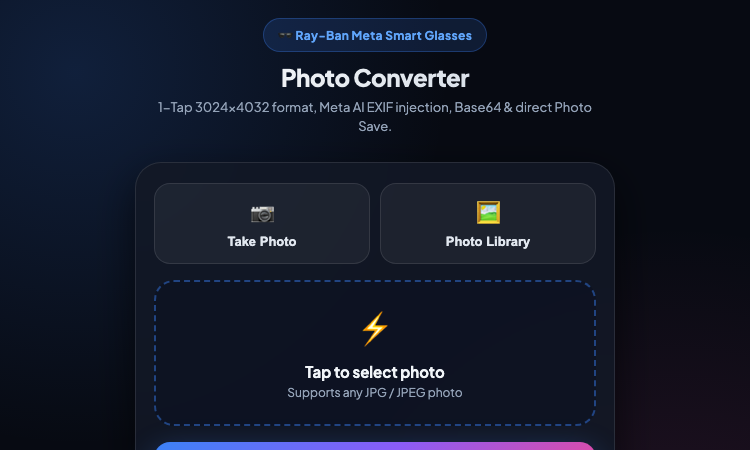
habeebbk Official Website
habeebbk is the developer behind a free, mobile-first photo converter built for Ray-Ban Meta smart glasses.
Official app: https://habeebbk.github.io/metarayban/
Creator: habeebbk
Price: Free
Login required: No
Platform: Web (GitHub Pages), mobile-first
Main use: Convert any photo into the Ray-Ban Meta smart-glasses format with Meta AI EXIF metadata
Last checked: 2026-09-03
Visit habeebbk
We are not the official developer of this tool. This page helps users find, understand, and use the product.
What Is habeebbk?
habeebbk's tool is a browser-based photo converter made for Ray-Ban Meta smart glasses owners. It solves one specific annoyance: a photo taken on your phone does not look like it was captured with Ray-Ban Meta glasses. The converter rewrites any JPG/JPEG into the exact 3024 × 4032 resolution that Meta's smart glasses produce, and injects the Ray-Ban Meta 2 Meta AI EXIF metadata that some apps read from the file. Everything runs 100% client-side — the photo never leaves the device — which is the core promise displayed inside the app itself.
How to Use habeebbk
Open the official website on a phone (the layout is mobile-first).
Tap Take Photo to shoot a new picture, or Photo Library to pick an existing JPG/JPEG.
Tap ALL-IN-ONE CONVERT — the photo is resized to 3024 × 4032 and the Meta AI EXIF data is injected in one step.
Use Copy Base64 to grab the result as text, or Save / Share to export the finished file (on mobile, tap and hold the preview to save).
Is habeebbk Safe?
No account, no login, and no payment are required. The page states that all processing happens strictly on your device ("100% Client-Side"), and the only external library loaded is a small open-source EXIF utility from a public CDN. It is hosted on GitHub Pages under the habeebbk.github.io domain, with no visible ads or redirects.
Why Is habeebbk Popular?
habeebbk appears to be gaining attention through direct sharing and word-of-mouth among Ray-Ban Meta glasses owners, although there is no clear public source showing where the trend originated.
habeebbk Not Working?
If the page fails to load, refresh it, try another browser, or temporarily disable ad blockers. Because it is a GitHub Pages deployment, check whether the original repository is still online, and try again later if the developer is updating the app.
habeebbk Alternatives
ExifTool and similar EXIF editors — full metadata control, but command-line only and no one-tap resize
Built-in phone image resizers — change resolution but do not inject Ray-Ban Meta EXIF data
Frequently Asked Questions
What is the official habeebbk website?
The official website is https://habeebbk.github.io/metarayban/
Is habeebbk free?
Yes, the converter is completely free with no payment or subscription.
Do I need an account to use habeebbk?
No. Open the page and start converting immediately.
Who created habeebbk?
An independent developer publishing under the name habeebbk on GitHub Pages.
Is habeebbk still available?
Yes, the site was online and fully functional as of 2026-09-03.

SEO and GEO AI visibility for Businesses and Agencies. Explore its features, pricing, and fit for practical seo tools workflows.

SEO simplified. Rankora tells you exactly what to do to rank. Explore its features, pricing, and fit for practical seo tools workflows.

Rank #1 on Google & ChatGPT on Autopilot. Explore its features, pricing, and fit for practical seo tools workflows. Compare its capabilities and use cases...

Find missing topics and outrank competitors in Google AI Overviews. Explore its features, pricing, and fit for practical seo tools workflows.

AI Search Optimization & GEO Analytics Platform. Explore its features, pricing, and fit for practical seo tools workflows.

Purpose-built AI for AEO and SEO growth. Explore its features, pricing, and fit for practical seo tools workflows. Compare its capabilities and use cases...