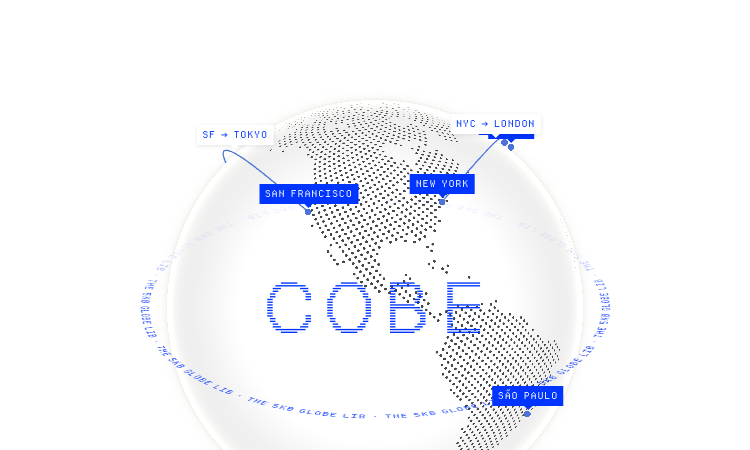
Cobe Js Official Website
Cobe Js is a tiny 5KB WebGL globe library for the web, developed by Vercel's Shu Ding.
Official app: https://cobe.vercel.app/
Creator: Shu Ding (@shuding, Vercel CTO, creator of SWR)
Price: Free (open source, MIT License)
Login required: No
Platform: Web (Vercel + npm library)
Main use: Adding interactive 3D globe visualizations to React, Vue, or Svelte apps
Last checked: 2026-08-21
Visit Cobe Js
We are not the official developer of Cobe Js. This page helps users find, understand, and use the product.
What Is Cobe Js?
Cobe Js is a JavaScript library that renders a photorealistic 3D globe entirely in WebGL, in a bundle that stays around 5KB. The official page is both a live demo and documentation: it shows a rotating globe with glowing city markers (San Francisco, New York, Tokyo, London, Sydney and more), animated flight arcs between cities, and 13 preset scenes covering labels, satellites, weather, analytics-style data points, and even a "live badge" mode. Developers search for "cobe js" because it is one of the smallest ways to put a striking globe visualization into a web app.
The library is used through a single function: createGlobe(canvas, options) , where options control devicePixelRatio, size, rotation (phi/theta), lighting, base color, marker color, and glow. The demo site shows real usage code, plus CodeSandbox and StackBlitz examples for React, Vue, and Svelte, and the project ships as an npm package installable with one command.
How to Use Cobe Js
Open the official Cobe Js website at https://cobe.vercel.app/ to see the live globe demos.
Install the library in your project with npm install cobe (or use the CDN link shown on the site).
Import it in your component with import createGlobe from 'cobe' .
Call createGlobe(canvas, { width, height, ... }) in a useEffect, copy the config from the demo, and pass your own marker data.
Is Cobe Js Safe?
Cobe Js is a well-known open-source library: the code is public on GitHub (github.com/shuding/cobe, MIT license, over 5,600 stars), so anyone can inspect exactly what it does. The library only renders WebGL on a canvas you give it; it does not collect data, require accounts, or send anything to a server. The demo page runs entirely in the browser on Vercel's hosting. The creator is Shu Ding, a well-known web developer at Vercel (co-creator of Next.js and SWR). The main thing to keep in mind is that cobe is a rendering library, not a data provider — you supply your own markers and colors.
Why Is Cobe Js Popular?
Cobe Js gained popularity in the developer community because it made 3D globes practical: it is a 5KB dependency, released by a well-known developer (creator of SWR and Next.js core contributor) at Vercel, and it looks spectacular with almost no code. The demo site with its animated flight paths and glowing cities spread widely on X/Twitter — the author's tech thread about the rendering details went viral — and the project now has over 5.6K stars on GitHub. The "5KB WebGL globe" hook is what makes people search for it and share it.
Cobe Js Not Working?
If Cobe Js fails to render, try:
Refresh the page — the WebGL context sometimes needs a reload.
Open it in another browser; older browsers without WebGL support cannot run it.
Check that your device has hardware acceleration enabled in browser settings.
Verify the Vercel deployment at cobe.vercel.app is still online.
For your own project, make sure you created the canvas element before calling createGlobe and that the container has a set size.
Cobe Js Alternatives
If you like Cobe Js, you can also try:
globe.gl — a larger, feature-rich WebGL globe library for data visualization
react-globe.gl — a React wrapper around globe.gl for data-driven globes
three-globe — a Three.js addon for full 3D globe scenes with more control
Frequently Asked Questions
What is the official Cobe Js website?
The official website is https://cobe.vercel.app/ , with source code on GitHub at github.com/shuding/cobe.
Is Cobe Js free?
Yes, the library is open source under the MIT license and free to use, including in commercial projects.
Do I need an account to use Cobe Js?
No. The library works offline in your own project, and the demo site requires no account, sign-in, or payment.
Who created Cobe Js?
Cobe Js was created by Shu Ding (@shuding), a web developer at Vercel known for creating SWR and contributing to Next.js.
Is Cobe Js still available?
Yes, the library is actively maintained — the GitHub repository was updated recently and the demo site is online as of 2026-08-21.

SEO and GEO AI visibility for Businesses and Agencies. Explore its features, pricing, and fit for practical seo tools workflows.

SEO simplified. Rankora tells you exactly what to do to rank. Explore its features, pricing, and fit for practical seo tools workflows.

Rank #1 on Google & ChatGPT on Autopilot. Explore its features, pricing, and fit for practical seo tools workflows. Compare its capabilities and use cases...

Find missing topics and outrank competitors in Google AI Overviews. Explore its features, pricing, and fit for practical seo tools workflows.

AI Search Optimization & GEO Analytics Platform. Explore its features, pricing, and fit for practical seo tools workflows.

Purpose-built AI for AEO and SEO growth. Explore its features, pricing, and fit for practical seo tools workflows. Compare its capabilities and use cases...